Designed for Busy Professionals: Schedule LinkedIn Posts in Seconds
Designed for Busy Professionals: Schedule LinkedIn Posts in Seconds
LinkedIn rewards consistency. But finding time every day to post? That’s where Schedul comes in. Create once, schedule ahead, and keep your profile active while you handle business. Consistent wins on LinkedIn.
Get a clear overview of your upcoming posts with our drag-and-drop content calendar. Easily manage your schedule, spot gaps, and stay consistent at a glance.
Analytics & Insights
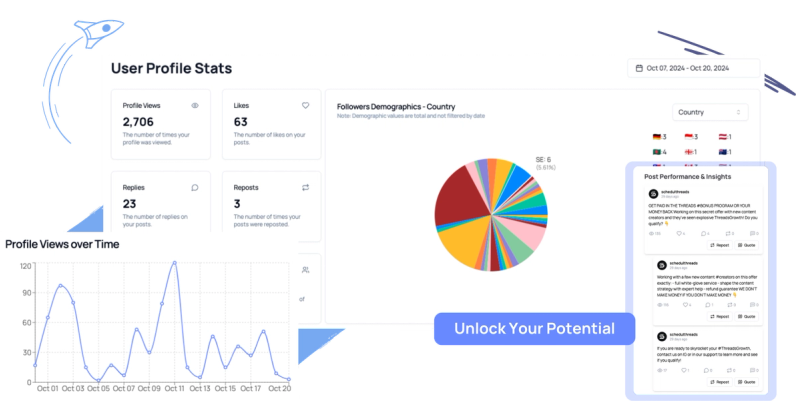
Track performance with real-time analytics that show views, engagement, and growth trends. Make informed decisions based on data, not guesswork. See what works; and why it works.
AI-Powered Scheduling
Let Schedul pick the best times to publish your content based on your audience’s activity. Maximize reach and engagement without lifting a finger.
Auto Reposting
Automatically recycle high-performing posts to reach new audiences. Keep your profile active without constantly creating new content. Extend the life of your best content.
Cross-Posting
Post once, publish everywhere. Write your content once and schedule it across LinkedIn and other supported platforms. Maintain a consistent voice while saving hours of manual effort.
Media Support
Easily upload and schedule posts with images, videos, and links. Make your content more engaging and professional in just a few clicks.
How To Schedule Linkedin Posts Effortlessly
Are you a social media manager juggling multiple accounts? A founder trying to build a presence while growing your business? Or maybe you're a busy professional who wants to stay consistent on LinkedIn?
You want to stay active on LinkedIn without logging in every single day. With Schedul, it’s never been easier to schedule LinkedIn posts ahead of time and stay consistent, even during your busiest weeks. Because, let’s be honest here, your coffee breaks shouldn’t be interrupted by posting duties.
Save Hours Every Week
Stop logging in every day just to post. With Schedul, you can batch your content, schedule a week (or month) ahead, and free up your time to focus on more important work.
Show Up Consistently Without Being Online
Stay visible to your network even when you're heads-down in work. With scheduled posts, your personal brand stays active even when you're offline.
Free Up Mental Space
No more last-minute content panic. With a content plan in place, you'll stop scrambling and start showing up with purpose and confidence.
Linkedin Built-In Scheduler vs. Schedul
LinkedIn’s native tools are great for one-off posts—but if you want to build a consistent presence, third-party tools like Schedul give you more flexibility and time-saving features.
Feature
LinkedIn Native
Schedul
Schedule Multiple Posts
✅
✅
View/Edit Scheduled Posts
✅
✅
AI Best-Time Suggestions
❌
✅
Analytics & Insights
❌
✅
Visual Calendar
❌
✅
Auto-Reposting
❌
✅
Got Questions? We've Got Answers!
Find answers to common inquiries
Can you schedule posts on LinkedIn?
Yes! You can schedule posts directly on LinkedIn using its native scheduler or through third-party tools like Schedul. Native scheduling allows you to set your posts up to 3 months in advance, while Schedul offers advanced features like AI-powered timing, cross-posting, and detailed analytics to maximize your LinkedIn presence.
How do I schedule posts on LinkedIn?
Scheduling LinkedIn posts with Schedul is simple: after signing in, connect your LinkedIn account, then click the "+ Compose" button to create your post. Choose your preferred date and time to schedule your post. Schedul makes it easy to batch content and plan ahead, so you can stay consistent without daily effort.
Manage More, Stress Less
Manage multiple accounts and collaborate with teams—all under one plan.
How to Schedule LinkedIn Posts with Schedul: 3 Simple Steps
If you want to take your LinkedIn presence to the next level, Schedul is the perfect tool for you. Designed specifically for busy professionals and marketers, it offers more power and flexibility than LinkedIn’s native scheduler. Let’s dive into how you can schedule LinkedIn posts for free with Schedul.
Step 1: Sign In to Schedul and Connect Your LinkedIn Account for Free Start by creating an account on Schedul and select the plan that fits your needs. Once you’re logged in, create an “organization” and connect your LinkedIn profile or company pages. You can easily manage multiple LinkedIn accounts from one dashboard.
Step 2: Click on "+ Compose" to Create Your LinkedIn Post To schedule posts, simply click the “+ Compose” button. Make sure your LinkedIn account is connected. Write your post, add images or videos if needed, then pick the exact date and time you want your post to go live.
Step 3: You Have Scheduled Your First LinkedIn Post That’s it! You’ve successfully scheduled your first LinkedIn post using Schedul. Now, you can focus on your work while Schedul automatically shares your content at the perfect time. To keep track of your planned posts, visit the “Calendar” section right under “Compose” for a clear overview of all your upcoming LinkedIn posts.
How to Schedule LinkedIn Posts for Free? (Native Version)
Did you know LinkedIn now lets you schedule posts directly on the platform? If you're not ready to switch to automation tools, like Schedul, just yet, here's how you can schedule LinkedIn posts natively, for free. We'll also walk you through how to view, edit, and reschedule them once they're live.
How to Schedule LinkedIn Posts Natively
Scheduling posts on LinkedIn is built into the platform and only takes a few steps:
1. Click "Start a post" at the top of your LinkedIn homepage.
2. Type your content in the "What do you want to talk about?" field.
3. Click the clock icon (🕒) in the bottom-right corner of the post window.
4. A new window will open; choose your date and time (up to 3 months in advance). You can select from dropdowns or manually type the exact time.
5. Click Next, then Schedule to confirm.
6. You'll see a confirmation message once your post is successfully scheduled.
How to View Your Scheduled Posts on LinkedIn
Want to double-check what you've scheduled? To view your scheduled posts on Linkedin, you have 3 simple steps:
1. Click "Start a post" from your homepage.
2. Tap the clock icon again in the lower-left corner.
3. Then click "View all scheduled posts" at the bottom of the pop-up.
You’ll be taken to a page showing all your scheduled posts, complete with previews.
How to Edit or Delete a Scheduled LinkedIn Post
Change your mind or want to tweak a post? No problem. Here's how to edit or delete a Linkedin post that you have scheduled.
1. From the Scheduled posts page, click the three dots (⋯) in the upper-right corner of the post.
2. Select "Edit post" to change the content, or "Modify schedule" to update the time.
3. To delete a post, just click the trash icon 🗑️, confirm the deletion, and you’re done.
How can I see my scheduled posts on LinkedIn?
If you’re using LinkedIn’s native scheduler, click “Start a post,” then tap the clock icon and select “View all scheduled posts” to see your upcoming posts. On Schedul, you can access your dynamic calendar to view all scheduled LinkedIn posts in one place, making it easy to manage and adjust your content plan.
How do I edit or reschedule a scheduled LinkedIn post?
For LinkedIn native posts, go to your scheduled posts list, click the three dots on the post you want to change, and choose “Edit post” or “Modify schedule.” With Schedul, simply find the post on your calendar, select it, and update the content or timing with just a few clicks.